# Javascript: How You Can Implement a Stack in 3 Mins
# Javascript: How You Can Implement a Stack in 3 Mins
Rocks stacked on each other
# Introduction
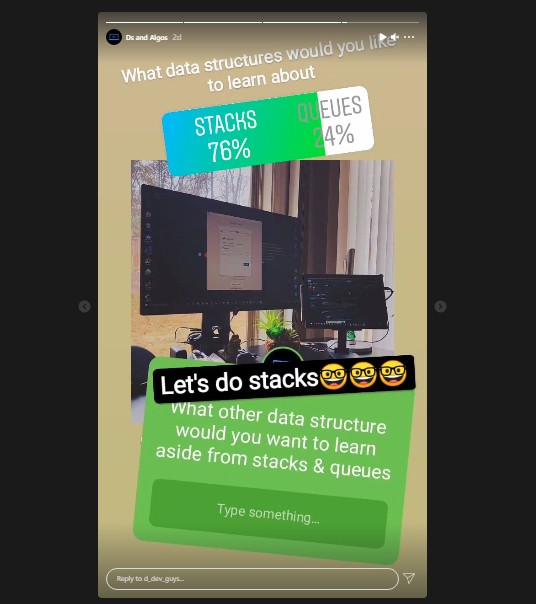
So, a few days ago, I ran a survey on my stories on [Instagram](https://www.instagram.com/d_dev_guys/) and the result of this survey is the reason I decided to write a blog post about the topic **STACKS** in using JavaScript.

Instagram poll
# **What's the stack data structure?**
A stack is a data structure that follows the **LAST IN FIRST OUT (LIFO)** principle. There are several real-world examples, e.g. plates, books stacked on each other, etc.

Books stacked on each other
The removal and addition of new items in a stack take place at the same end. This is because stacks follow the **LIFO** principle this means that the newly added items are the first to be removed.
# **Let’s create a stack**
Enough of the explanations, let's write some codes🤓🤓🤓! We start with the basics and declare a class using an array in the constructor property of our class.
```
class Stack {
constructor() {
this.items = [];
} //methods to be implemented go here
Push(item)
Pop()
Peek()
isEmpty()
Clear()
Size()
Print()
}
```
# Let’s implement each method for our stack Class.
**Push**: This adds items or an item to the top of the stack.
```
Push(item) {
//pushing an item into the stack
this.items.push(item)
}
```
**Pop**: This removes the top item from the stack and returns the removed item.
```
Pop() {
//removes an item from the stack
_return_ this.items.pop()
}
```
**Peek**: This returns the top element from the stack but doesn’t modify it (it doesn’t remove it).
```
Peek() {
//returning the top item without modifying it
_return_ this.items[this.items.length - 1]
}
```
**isEmpty**: This returns false if the stack contains items but returns true if it does not contain an item.
```
isEmpty() {
//return true if the stack is empty
_return_ this.items.length == 0;
}
```
**Clear**: This would remove all the items from the stack.
```
Clear() {
//output all the content of the stacks
_return_ this.items = [];
}
```
**Size**: This returns all the number of items contained in the stack. (this is similar to the length property of the array data-structure)
```
Size() {
//returns the number of items in the stack
_return_ this.items.length;
}
```
**Print:** This would output the content of the stack.
```
Print() {
//output all the content of the stacks
console.log(this.items.toString())
}
```

**YOOHOO**…Champ! You made it this far! You are absolutely amazing
# **Let’s use the stack class**
The first thing we have to do is to instantiate the stack class we created.
```
//instantiating the stack
let stack = new Stack()
```
Next, we can add some items (we push 1 and 2, we can push any item to the stack)
```
//pushing a new item to stack
stack.Push(1)
stack.Push(2)
```
Next, we can go ahead to test if the items were added to the stack. This should return _false._
```
_//_returns _false_
console.log(stack.isEmpty());
```
Let’s go ahead and call the peek method, we would get **_2_** this is because it’s the last element added to the stack.
```
//returns _2_
Console.log(stack.Peek());
```
Let’s go ahead and add one item to the stack.
```
//adds _3_ to the stack
stack.Push(3);
```
Let’s check the size to confirm how many items are in our stack.
```
//out puts _3_
console.log(stack.Size());
```
Let’s print all the items in our stack
```
//returns [1,2,3]
Stack.Print()
```
Let’s go ahead and remove the item from the stack
```
//removes each item from the stack
Stack.Pop()
Stack.Pop()
Stack.Pop()
```
Let’s check once again if it’s empty
```
//returns true
Stack.isEmpty();
```
There you have it!!!
In just a few simple steps we have implemented stacks using JavaScript.
As with everything it really goes into practicing these steps so you get to understand it deeply. In a later article, I would be writing about the application of stacks as well as solving some common computer science problems with it.
If you enjoyed this article why not follow me on [Twitter](https://twitter.com/chineduvictor7), also take a screenshot and send a DM on [Instagram](https://www.instagram.com/d_dev_guys/), I will give you a shoutout alongside other of our 36k community members.😉😉😉
Cheers! Happy Hacking.
 Rocks stacked on each other
# Introduction
So, a few days ago, I ran a survey on my stories on [Instagram](https://www.instagram.com/d_dev_guys/) and the result of this survey is the reason I decided to write a blog post about the topic **STACKS** in using JavaScript.

Rocks stacked on each other
# Introduction
So, a few days ago, I ran a survey on my stories on [Instagram](https://www.instagram.com/d_dev_guys/) and the result of this survey is the reason I decided to write a blog post about the topic **STACKS** in using JavaScript.

 Instagram poll
# **What's the stack data structure?**
A stack is a data structure that follows the **LAST IN FIRST OUT (LIFO)** principle. There are several real-world examples, e.g. plates, books stacked on each other, etc.

Instagram poll
# **What's the stack data structure?**
A stack is a data structure that follows the **LAST IN FIRST OUT (LIFO)** principle. There are several real-world examples, e.g. plates, books stacked on each other, etc.

 Books stacked on each other
The removal and addition of new items in a stack take place at the same end. This is because stacks follow the **LIFO** principle this means that the newly added items are the first to be removed.
# **Let’s create a stack**
Enough of the explanations, let's write some codes🤓🤓🤓! We start with the basics and declare a class using an array in the constructor property of our class.
```
class Stack {
constructor() {
this.items = [];
} //methods to be implemented go here
Push(item)
Pop()
Peek()
isEmpty()
Clear()
Size()
Print()
}
```
# Let’s implement each method for our stack Class.
**Push**: This adds items or an item to the top of the stack.
```
Push(item) {
//pushing an item into the stack
this.items.push(item)
}
```
**Pop**: This removes the top item from the stack and returns the removed item.
```
Pop() {
//removes an item from the stack
_return_ this.items.pop()
}
```
**Peek**: This returns the top element from the stack but doesn’t modify it (it doesn’t remove it).
```
Peek() {
//returning the top item without modifying it
_return_ this.items[this.items.length - 1]
}
```
**isEmpty**: This returns false if the stack contains items but returns true if it does not contain an item.
```
isEmpty() {
//return true if the stack is empty
_return_ this.items.length == 0;
}
```
**Clear**: This would remove all the items from the stack.
```
Clear() {
//output all the content of the stacks
_return_ this.items = [];
}
```
**Size**: This returns all the number of items contained in the stack. (this is similar to the length property of the array data-structure)
```
Size() {
//returns the number of items in the stack
_return_ this.items.length;
}
```
**Print:** This would output the content of the stack.
```
Print() {
//output all the content of the stacks
console.log(this.items.toString())
}
```

Books stacked on each other
The removal and addition of new items in a stack take place at the same end. This is because stacks follow the **LIFO** principle this means that the newly added items are the first to be removed.
# **Let’s create a stack**
Enough of the explanations, let's write some codes🤓🤓🤓! We start with the basics and declare a class using an array in the constructor property of our class.
```
class Stack {
constructor() {
this.items = [];
} //methods to be implemented go here
Push(item)
Pop()
Peek()
isEmpty()
Clear()
Size()
Print()
}
```
# Let’s implement each method for our stack Class.
**Push**: This adds items or an item to the top of the stack.
```
Push(item) {
//pushing an item into the stack
this.items.push(item)
}
```
**Pop**: This removes the top item from the stack and returns the removed item.
```
Pop() {
//removes an item from the stack
_return_ this.items.pop()
}
```
**Peek**: This returns the top element from the stack but doesn’t modify it (it doesn’t remove it).
```
Peek() {
//returning the top item without modifying it
_return_ this.items[this.items.length - 1]
}
```
**isEmpty**: This returns false if the stack contains items but returns true if it does not contain an item.
```
isEmpty() {
//return true if the stack is empty
_return_ this.items.length == 0;
}
```
**Clear**: This would remove all the items from the stack.
```
Clear() {
//output all the content of the stacks
_return_ this.items = [];
}
```
**Size**: This returns all the number of items contained in the stack. (this is similar to the length property of the array data-structure)
```
Size() {
//returns the number of items in the stack
_return_ this.items.length;
}
```
**Print:** This would output the content of the stack.
```
Print() {
//output all the content of the stacks
console.log(this.items.toString())
}
```

 **YOOHOO**…Champ! You made it this far! You are absolutely amazing
# **Let’s use the stack class**
The first thing we have to do is to instantiate the stack class we created.
```
//instantiating the stack
let stack = new Stack()
```
Next, we can add some items (we push 1 and 2, we can push any item to the stack)
```
//pushing a new item to stack
stack.Push(1)
stack.Push(2)
```
Next, we can go ahead to test if the items were added to the stack. This should return _false._
```
_//_returns _false_
console.log(stack.isEmpty());
```
Let’s go ahead and call the peek method, we would get **_2_** this is because it’s the last element added to the stack.
```
//returns _2_
Console.log(stack.Peek());
```
Let’s go ahead and add one item to the stack.
```
//adds _3_ to the stack
stack.Push(3);
```
Let’s check the size to confirm how many items are in our stack.
```
//out puts _3_
console.log(stack.Size());
```
Let’s print all the items in our stack
```
//returns [1,2,3]
Stack.Print()
```
Let’s go ahead and remove the item from the stack
```
//removes each item from the stack
Stack.Pop()
Stack.Pop()
Stack.Pop()
```
Let’s check once again if it’s empty
```
//returns true
Stack.isEmpty();
```
There you have it!!!
In just a few simple steps we have implemented stacks using JavaScript.
As with everything it really goes into practicing these steps so you get to understand it deeply. In a later article, I would be writing about the application of stacks as well as solving some common computer science problems with it.
If you enjoyed this article why not follow me on [Twitter](https://twitter.com/chineduvictor7), also take a screenshot and send a DM on [Instagram](https://www.instagram.com/d_dev_guys/), I will give you a shoutout alongside other of our 36k community members.😉😉😉
Cheers! Happy Hacking.
**YOOHOO**…Champ! You made it this far! You are absolutely amazing
# **Let’s use the stack class**
The first thing we have to do is to instantiate the stack class we created.
```
//instantiating the stack
let stack = new Stack()
```
Next, we can add some items (we push 1 and 2, we can push any item to the stack)
```
//pushing a new item to stack
stack.Push(1)
stack.Push(2)
```
Next, we can go ahead to test if the items were added to the stack. This should return _false._
```
_//_returns _false_
console.log(stack.isEmpty());
```
Let’s go ahead and call the peek method, we would get **_2_** this is because it’s the last element added to the stack.
```
//returns _2_
Console.log(stack.Peek());
```
Let’s go ahead and add one item to the stack.
```
//adds _3_ to the stack
stack.Push(3);
```
Let’s check the size to confirm how many items are in our stack.
```
//out puts _3_
console.log(stack.Size());
```
Let’s print all the items in our stack
```
//returns [1,2,3]
Stack.Print()
```
Let’s go ahead and remove the item from the stack
```
//removes each item from the stack
Stack.Pop()
Stack.Pop()
Stack.Pop()
```
Let’s check once again if it’s empty
```
//returns true
Stack.isEmpty();
```
There you have it!!!
In just a few simple steps we have implemented stacks using JavaScript.
As with everything it really goes into practicing these steps so you get to understand it deeply. In a later article, I would be writing about the application of stacks as well as solving some common computer science problems with it.
If you enjoyed this article why not follow me on [Twitter](https://twitter.com/chineduvictor7), also take a screenshot and send a DM on [Instagram](https://www.instagram.com/d_dev_guys/), I will give you a shoutout alongside other of our 36k community members.😉😉😉
Cheers! Happy Hacking.